Exploring 3 Robotic Computer Vision Models and Their Effective Ranges
CYSF · 2025
Overview
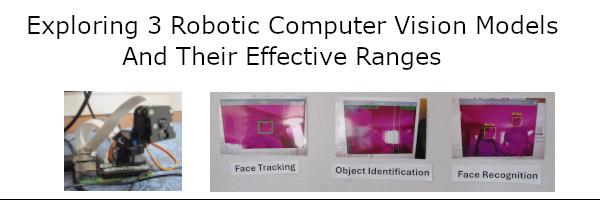
We will look at 3 different ways to identify objects and faces with computer vision models. These include object recognition, face recognition, and face tracking. How they can be applied to robotics will also be demonstrated.
Problem
We will look at 3 different ways to identify objects and faces and how they are similar and different.
•
Object Recognition
•
Face Recognition
•
Face Tracking
Robotics are applied to each of the computer vision models through the use of a servo being triggered by some event.
We will also detail some of the limitations of each model with respect to the distance from the camera. This can provide some insight into the effectiveness of each model when applied to common scenarios including security cameras, automobile self driving and robotic applications.
Method
Initial setup
We initially researched Youtube videos on the Raspberry Pi and Vision
We ordered some equipment and had to learn how the Raspberry Pi worked and the camera.
There were struggles and learnings throughout this project
Hardware and Key Technologies
•
Raspberry Pi 4 8GB
•
Raspberry official Camera
•
Pimoroni Pantilt Camera
•
SG90 9g micro servo
•
OpenCV
•
Python language
Getting each Individual Model working
There were a number of videos that we researched on YouTube.com to get each of the 3 models working.
All code was placed in a central folder with an individual folder for each of the 3 computer vision folders.
Some modifications were made to some of the computer vision models to incorporate a trigger to operate the servo for a given event.
Below is a summary of each computer vision model and its location on our Raspberry Pi
Each of the following demonstrations can be found in a subfolder on the Raspberry Pi in the /home/pi/demo folder. Use File Manager
Pimoroni Pantilt Camera Setup
Folder: /home/pi/demo/keyboard
Open a terminal and type:
cd /home/pi/demo/keyboard
python smooth.py
smooth.py - Simply shows the control of the camera with a python program
python KeyboardPanTilt.py
KeyboardPanTilt.py - allows user to control the keyboard by the keyboard and use p to take pictures and q to quit
Face Tracking
Folder: /home/pi/demo/facetracking
Open the following File Manager and go to the folder above
Run the programs below in Thonny
facetracker.py - Tracks a face on the screen with a green square
sentry.py - Tracks but with sentry mode, will present a blue square
Object Detection
Folder: /home/pi/demo/objectdetection
Open the following File Manager and go to the folder above
Run the programs below in Thonny
object-ident.py - identify individual objects in the camera
Servo 90g setup: Red to pin 4, Brown to pin 14, Orange to pin 16
servo.py - demonstrate how a servo can be manipulated
servoangle.py - experiment further with the servo (Setting angles between 0 and 180 degrees)
Object-ident-filter.py - move the servo on the capture of a certain object
Face Recognition
Folder: /home/pi/demo/facerecognition
Open the following File Manager and go to the folder above
Run the programs below in Thonny
head_shots.py - capture some pictures of a face for training
Create a folder in the dataset folder that matches the name=’Aidan’ in this program
Run the program and press spacebar to capture 6-10 photos
train_model.py - train the model on the pictures in the data set folder
Run this program to train the model
facial_req.py - run the trained model to identify certain facial images with the camera
Run this program to see it identify faces
facial_req_withservo.py - run the trained model to identify certain facial images with the camera
Update the trackingName in this program to move the servo for a specific person
Run this program to identify faces and turn the servo when it finds the trackingName person
Servo 90g setup: Red to pin 4, Brown to pin 14, Orange to pin 16
Research
Once we got each of the computer vision models we did some basic experimentation with each of them and found the following for each model:
Object Recognition
Object Recognition worked on a number of predefined objects once the program was run. We experimented on a number of objects. The code could be modified to trigger a servo (robotic extenstion to the system) when looking for a specific object such as a bottle, teddy bear or a person.
It was noted that there sometimes was a lag in object recognition due to a build up of frames for the program to process. A quicker processor might solve this.
Face Recognition
The goal of face recognition is to identify different faces from different people.
There are 3 phases to face recognition:
•
Data Collection: gathering images/photos of a person under their folder
•
Training: training the program to match which facial features to each person
•
Running the model: running the model to detect faces
It was noted that it might have trouble if the person tilted their head in a way that was different from the training data.
There was a lag due to processing sometimes where the program was several seconds behind.
A servo could be triggered when a certain individual’s face appeared.
Face Tracking
This involved setting up the Pimoroni PanTilt Camera and running it’s program. It essentially locks onto a face and can move to track the face around the room.
There was a sentry mode used to search out faces in the room as a mobile security camera might do.
The camera itself has 2 servos for vertical tilting and horizontal panning.
Analysis
Once we got each of the computer vision models we did some basic experimentation with each of them and found the following for each model:
Object Recognition
Object Recognition worked on a number of predefined objects once the program was run. We experimented on a number of objects. The code could be modified to trigger a servo (robotic extenstion to the system) when looking for a specific object such as a bottle, teddy bear or a person.
It was noted that there sometimes was a lag in object recognition due to a build up of frames for the program to process. A quicker processor might solve this.
Face Recognition
The goal of face recognition is to identify different faces from different people.
There are 3 phases to face recognition:
•
Data Collection: gathering images/photos of a person under their folder
•
Training: training the program to match which facial features to each person
•
Running the model: running the model to detect faces
It was noted that it might have trouble if the person tilted their head in a way that was different from the training data.
There was a lag due to processing sometimes where the program was several seconds behind.
A servo could be triggered when a certain individual’s face appeared.
Face Tracking
This involved setting up the Pimoroni PanTilt Camera and running it’s program. It essentially locks onto a face and can move to track the face around the room.
There was a sentry mode used to search out faces in the room as a mobile security camera might do.
The camera itself has 2 servos for vertical tilting and horizontal panning.
Data
In addition to learning more about how each computer vision model worked we explored the general maximum effective range of each of the models.
We measured the maximum distance that each model could function from the camera. It must be noted that conditions can be varied.
This test was carried out by averaging the 10 trials from both of us
Computer Vision Model | Facial Recognition | Face Tracking | Object Identification
| | |
Maximum Range | 2.29 m (7.5 feet) | 2.6 m (8.5 feet) | 6.1 m (20 feet)
We acknowledge that the data could change depending on a number of factors including lighting, background noise. We believe that the specific distance is not that important but understanding which model can work further from the camera and which are most limited.
Conclusion
We demonstrated that we could get 3 different computer vision models working for the first time. This was challenging as we had to navigate getting the Raspberry Pi up and running. We had to spend a lot of time getting each of the models to work and understanding them. There were additional challenges with incorporating servo functionality as well.
We were able to demonstrate how these computer vision models work with servos. The servos represent a robotic application. We were able to determine the effective ranges of each of the computer vision models. To summarize, we found that the 3 computer vision models had different effective ranges which are important when building computer vision solutions.
The Facial Recognition model's effective range was found to be 2.29 m (7.5 feet). Face Tracking was found to have a range of 2.6 m (8.5 feet) and Object Identification had the longest range of 6.1 m (20 feet). The effective ranges are inversely proportional to the amount of detail required. Facial Recognition requires the most detail, followed by Face Tracking which involves identification of a face but not a specific face. Object Identification requires a lower amount of detail which means its effective range is longest. This information is important when considering the building of a Computer Vision model and ensuring its effectiveness.
Although this was a first attempt it was successful in understanding the potential and limitations.
For future experiments, we can look at more complicated examples with different computer vision models or incorporating more complex robotic examples. We illustrated the use of a simple servo but a more complicated setup of multiple servos can lead to more sophisticated robotics applications. Potential applications include security cameras, automobile self driving and robotic applications.
Citations
Core Electronics (2021a) Easiest Pan-Tilt System for the Raspberry Pi – Quick Start Guide with Pimoroni Picade HAT . Retrieved on October 5, 2024 from https://www.youtube.com/watch?v=Dc9AEFw0hww
Core Electronics (2021b) Face & Movement Tracking System Using a Raspberry Pi + OpenCV + Pan-Tilt HAT + Python . Retrieved on October 5, 2024 from https://www.youtube.com/watch?v=T_892SKVNf4
Core Electronics (2021c) Object Identification & Animal Recognition With Raspberry Pi + Open CV + Python . Retrieved on October 5, 2024 from https://www.youtube.com/watch?v=iOTWZI4RHA8
Core Electronics (2021d) Face Recognition With Raspberry Pi + OpenCV + Python . Retrieved on October 5, 2024 from https://www.youtube.com/watch?v=o-x1PE0LVKM
ExplainingComputers(2020). Raspberry Pi Servo Motor Control. Retrieved on January 21, 2025 from https://www.youtube.com/watch?v=xHDT4CwjUQE
Mafukidze, Harry (ND). How to use Servos on the Raspberry Pi. Retrieved on January 20, 2025 from https://www.circuitbasics.com/how-to-use-servos-on-the-raspberry-pi/
Miller, Liz. (2024). How to Control a Servo with Raspberry Pi. Retrieved January 20, 2025 from https://www.learnrobotics.org/blog/raspberry-pi-servo-motor/
Ogonyesolomonoche (ND). Controlling Servo Motor (Sg90) With Raspberry Pi 4. Retrieved on January 20, 2025 from https://www.instructables.com/Controlling-Servo-Motor-Sg90-With-Raspberry-Pi-4/
Acknowledgement
We worked a lot to get these computer vision models working. We are thankful to Core Electronics to publish videos showing how to do much of these. Also we are thankful for the Open CV and COCO teams for publishing open source computer vision code that works.
Awards (1)
- SILVER
Competition history
- CYSF 2025
Resources
- Presentation
- Not working? Open in a new tab.
- https://www.youtube.com/watch?v=Dc9AEFw0hww
- https://www.youtube.com/watch?v=T_892SKVNf4
- https://www.youtube.com/watch?v=iOTWZI4RHA8
- https://www.youtube.com/watch?v=o-x1PE0LVKM
- https://www.youtube.com/watch?v=xHDT4CwjUQE
- https://www.circuitbasics.com/how-to-use-servos-on-the-raspberry-pi/
- https://www.learnrobotics.org/blog/raspberry-pi-servo-motor/
- https://www.instructables.com/Controlling-Servo-Motor-Sg90-With-Raspberry-Pi-4/
- View Log Book (may download a file)
- View Extra Attachment: report/data/exhibit/etc (may download a file)
Related projects
ISEF · 2017
Vision Based Robot Intelligence
ISEF · 2015
Object Recognition Based UAV Control
ISEF · 2021
3D Depth Mapping Vision System Worthy of an Extraterrestrial
ISEF · 2018
Deep Learning Real-Time Object Detection Through Convolutional Neural Networks Using OpenCV and Optical Flow Algorithms for the Visually-Impaired
ISEF · 2025
Multi UAV System for Wide Area Object Identification
ISEF · 2020
Real-Time Object Search and Detection for the Visually Impaired
ISEF · 2022
Emulating Human Vision Processes To Quantify an Environment
ISEF · 2024
An Improved Deep Neural Architecture Search Net-Based Wearable Object Classification System for the Visually Impaired
Closest projects by meaning, across every fair and year in the corpus.
Source: Calgary Youth Science Fair